# Rippling HRIS API guide
> Use the Rippling HRIS API to list workers, users, compensation, and draft hires.
## Overview
HRIS APIs offer access to foundational employee data (such as compensation, workers, and users) used across multiple Rippling products.
| API endpoint | Required scopes | Schema | Notes / Requirements |
| --- | --- | --- | --- |
| [GET List compensations](https://developer.rippling.com/documentation/rest-api/reference/list-compensations) | - `compensations.read` | - `Compensation`
- `RedactedFields` | |
| [GET Retrieve a specific compensation](https://developer.rippling.com/documentation/rest-api/reference/get-compensations) | - `compensations.read` | - `Compensation`
- `MetaResponse` | - Requires a compensation `id` from GET List compensations. |
| [GET List users](https://developer.rippling.com/documentation/rest-api/reference/list-users) | - `users.read` | - `User`
- `RedactedFields` | |
| [GET Retrieve a specific user](https://developer.rippling.com/documentation/rest-api/reference/get-users) | - `users.read` | - `User`
- `MetaResponse` | - Requires a user `id` from GET List users. |
| [GET List workers](https://developer.rippling.com/documentation/rest-api/reference/list-workers) | - `workers.read` | - `Worker`
- `RedactedFields` | |
| [GET Retrieve a specific worker](https://developer.rippling.com/documentation/rest-api/reference/get-workers) | - `workers.read` | - `Worker`
- `MetaResponse` | - Requires a worker `id` from GET List workers. |
| [GET List entitlements](https://developer.rippling.com/documentation/rest-api/reference/list-entitlements) | - `entitlements.read` | - `EntitlementModel`
- `RedactedFields` | |
| [GET Retrieve my SSO information](https://developer.rippling.com/documentation/rest-api/reference/list-sso-me) | - `sso-me.read` | - `SSOMe` | |
| [POST Create bulk draft hire](https://developer.rippling.com/documentation/rest-api/reference/create-draft-hires) | - `draft-hires.read-write` | - `BulkDraftHireRequest` | |
### Employee lifecycle
1. **Hire**: Create the person as a draft hire using [POST Create bulk draft hire](https://developer.rippling.com/documentation/rest-api/reference/create-draft-hires), and have an admin [finish the hiring in Rippling](https://developer.rippling.com/documentation/rest-api/guides/drafthires). After completion, the new employee will be available from [GET List workers](https://developer.rippling.com/documentation/rest-api/reference/list-workers) and [GET List users](https://developer.rippling.com/documentation/rest-api/reference/list-users).
2. **Attach onboarding documents**: Attach an offer letter to a draft hire or an identification document to an existing worker [using the Files API](https://developer.rippling.com/documentation/rest-api/guides/file-uploads).
3. **Worker changes**: [View worker changes](https://developer.rippling.com/documentation/rest-api/guides/worker-changes) that have previously been made or [schedule a new worker change](https://developer.rippling.com/documentation/rest-api/guides/schedule-worker-changes).
* * *
## Permissions & scopes
Rippling's V2 API uses a permissions-based access model. The data returned by an endpoint depends on:
- The permission profile of the user who creates the API token. This includes the **permission scope** (e.g., _“The entire company”_ vs. _“Direct reports only”_) and **employment data access level** (e.g., _“View and edit all sensitive data”_ vs. _“View all basic personal”_).
- The scopes selected when the token is created.
Each endpoint lists its required scopes in the **Required Scopes** section of the API documentation.
#### Example
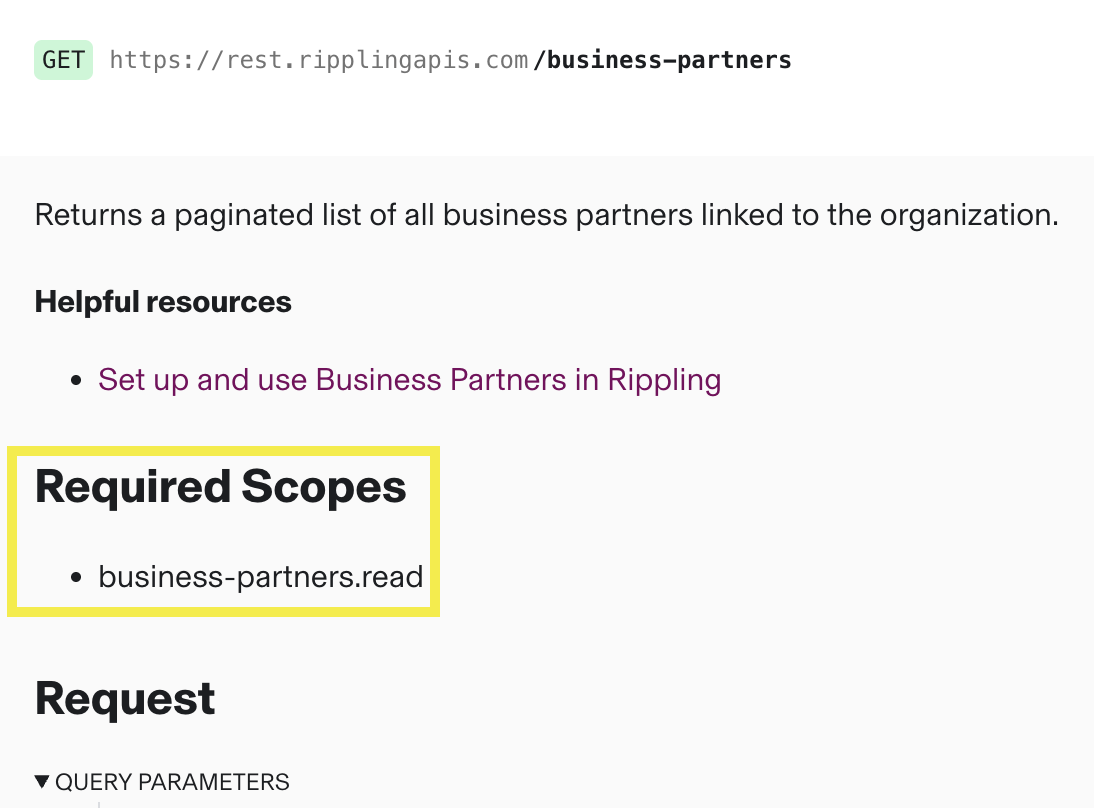
For which Worker, User, and Compensation fields that access includes, see [Worker and user field access](https://developer.rippling.com/documentation/rest-api/guides/worker-field-access). For managing access with API tokens and permission profiles, see [API Tokens and Permissions](https://developer.rippling.com/documentation/rest-api/essentials/api-tokens).
* * *
## Call the API
To call an HRIS API endpoint:
1. Verify the user’s permission profile and ensure they have the permissions required to access the desired data.
> **Note:**
> If the user’s permissions are limited (for example, _“Basic personal data for direct reports only”_):
>
> - Some scopes will not be available when creating the API token.
> - The API response will return limited data.
2. Create an API token in the [Developer app](https://app.rippling.com/api-tokens/tokens) with the required scopes.
3. Call the endpoint using the generated token.
Some endpoints require a specific resource ID (for example, a `worker_id`). In these cases, call the corresponding list endpoint first to fetch the ID (e.g. call GET List workers before calling GET Retrieve a specific worker).
> **Pro tip:**
> 💡 Remember to `expand` your API call to receive a more detailed API response.
>
> For example, `GET 'https://rest.ripplingapis.com/workers/?expand=user'` will ensure worker _and_ user information is returned (permanent profile number, address, phone number, etc.).
### Example: GET List compensations
_Request:_
```text
curl -L -X GET 'https://rest.ripplingapis.com/compensations' \
-H 'Accept: application/json' \
-H 'Authorization: Bearer REDACTED'
```
_Response:_
```text
{
"results": [
{
"id": "65699284fb7bc7c3510f452b",
"created_at": "2023-12-01T08:00:04.090000+00:00",
"updated_at": "2025-11-23T08:28:35.124000+00:00",
"worker_id": "65699281fb7bc7c3510f44a6",
"worker": null,
"annual_compensation": {
"currency_type": "USD",
"value": 250000
},
"annual_salary_equivalent": null,
"hourly_wage": {
"currency_type": "USD",
"value": 120.19
},
"monthly_compensation": {
"currency_type": "USD",
"value": 20833.33
}
},
],
}
```
* * *
## See also
- [Rippling Hiring](https://help.rippling.com/page?page=hiring)
- [Rippling U Getting Started: Hiring](https://learn.rippling.com/getting-started-hiring)
- [Create and Bulk Hire Draft Hires](https://developer.rippling.com/documentation/rest-api/guides/drafthires)
- [Upload and Attach Files](https://developer.rippling.com/documentation/rest-api/guides/file-uploads)
- [Worker and user field access](https://developer.rippling.com/documentation/rest-api/guides/worker-field-access)
- [View Worker Changes](https://developer.rippling.com/documentation/rest-api/guides/worker-changes)
- [Schedule Worker Changes](https://developer.rippling.com/documentation/rest-api/guides/schedule-worker-changes)
Source: https://developer.rippling.com/documentation/rest-api/guides/hris-getting-started
> For the complete documentation index, see [llms.txt](https://developer.rippling.com/llms.txt). Public pages have a Markdown version at the same URL with .md added.