# Get started with the Supergroups API
> Call the Supergroups API to list or update supergroups and their members.
## Overview
Supergroups APIs offer access to supergroup data in Rippling. Once defined, these supergroups can be reused anywhere you use groups in Rippling, like integrations, automations, and policies.
| API endpoint | Required scopes | Schema | Notes / Requirements |
| --- | --- | --- | --- |
| [GET List supergroups](https://developer.rippling.com/documentation/rest-api/reference/list-supergroups) | - `supergroups.read` | - `Supergroup`
- `RedactedFields` | |
| [GET Retrieve a specific supergroup](https://developer.rippling.com/documentation/rest-api/reference/get-supergroups) | - `supergroups.read` | - `Supergroup`
- `MetaResponse` | - Requires `id` from GET List supergroups. |
| [GET List supergroup members](https://developer.rippling.com/documentation/rest-api/reference/list-supergroups-group-id-members) | - `supergroups.read` | - `GroupMember`
- `RedactedFields` | - Requires `group_id` from GET List supergroups (`id`). |
| [GET List supergroup inclusion members](https://developer.rippling.com/documentation/rest-api/reference/list-supergroups-group-id-inclusion-members) | - `supergroups.read` | - `GroupMember`
- `RedactedFields` | - Requires `group_id` from GET List supergroups (`id`). |
| [GET List supergroup exclusion members](https://developer.rippling.com/documentation/rest-api/reference/list-supergroups-group-id-exclusion-members) | - `supergroups.read` | - `GroupMember`
- `RedactedFields` | - Requires `group_id` from GET List supergroups (`id`). |
| [PATCH Update supergroup inclusion members](https://developer.rippling.com/documentation/rest-api/reference/update-supergroups-group-id-inclusion-members) | - `supergroups.read-write` | | - Requires `group_id` from GET List supergroups (`id`). |
| [PATCH Update supergroup exclusion members](https://developer.rippling.com/documentation/rest-api/reference/update-supergroups-group-id-exclusion-members) | - `supergroups.read-write` | | - Requires `group_id` from GET List supergroups (`id`). |
* * *
## Permissions & scopes
Rippling's V2 API uses a permissions-based access model. The data returned by an endpoint depends on:
- The permission profile of the user who creates the API token. This includes the **permission scope** (e.g., _“The entire company”_ vs. _“Direct reports only”_) and **employment data access level** (e.g., _“View and edit all sensitive data”_ vs. _“View all basic personal”_).
- The scopes selected when the token is created.
Each endpoint lists its required scopes in the **Required Scopes** section of the API documentation.
#### Example
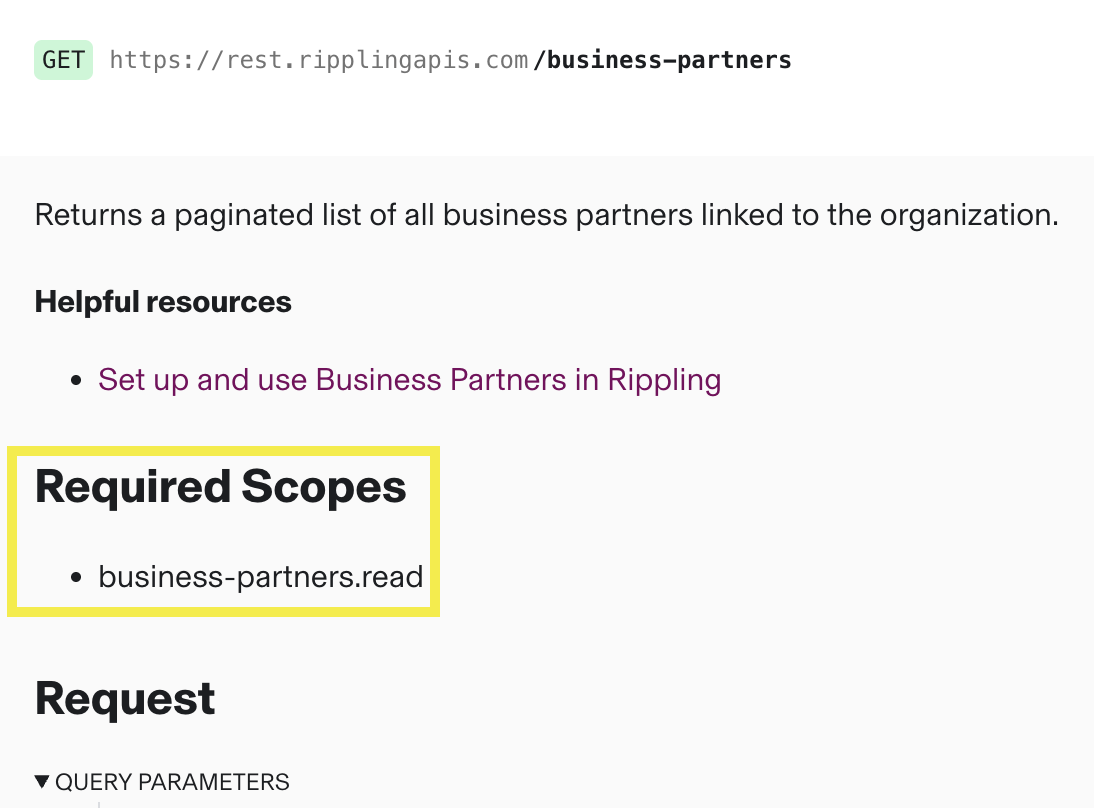
For more information on managing access using API tokens and permission profiles, see [API Tokens and Permissions](https://developer.rippling.com/documentation/rest-api/essentials/api-tokens).
* * *
## Call the API
To call a Supergroups API endpoint:
1. Verify the user’s permission profile and ensure they have the permissions required to access the desired data.
> **Note:**
> If the user’s permissions are limited (for example, _“Basic personal data for direct reports only”_):
>
> - Some scopes will not be available when creating the API token.
> - The API response will return limited data.
2. Create an API token in the [Developer app](https://app.rippling.com/api-tokens/tokens) with the required scopes.
3. Call the endpoint using the generated token.
Some endpoints require a specific resource ID (for example, a `worker_id`). In these cases, call the corresponding list endpoint first to fetch the ID (e.g. call GET List workers before calling GET Retrieve a specific worker).
### Example: GET List supergroups
_Request:_
```text
curl -L -X GET ‘https://rest.ripplingapis.com/supergroups'’ \
-H 'Accept: application/json' \
-H 'Authorization: Bearer REDACTED'
```
_Response:_
```text
{
"results": [
{
"id": "65699280fb7bc7c3510f9043",
"created_at": "2023-12-01T08:00:00.352000+00:00",
"updated_at": "2024-03-19T22:17:47.664000+00:00",
"display_name": "Rippling_custom_worker_onboard_tshirtSize",
"name": "Rippling_custom_worker_onboard_tshirtSize",
"app_owner_id": "65699281fb7bc7c3510f3ce2",
"group_type": null,
"sub_group_type": null,
"read_only": false,
"description": null,
"parent": null,
"mutually_exclusive_key": null,
"cumulatively_exhaustive_default": false,
"include_terminated": false,
"allow_non_employees": false,
"can_override_role_states": false,
"priority": null,
"is_invisible": false,
"ignore_prov_group_matching": false
},
],
"next_link": null
}
```
Source: https://developer.rippling.com/documentation/rest-api/guides/supergroups-getting-started
> For the complete documentation index, see [llms.txt](https://developer.rippling.com/llms.txt). Public pages have a Markdown version at the same URL with .md added.