Overview
Rippling offers a range of products, such as HR, IT, and Finance, that help customers manage their workforce and employee data. But Rippling also helps you go further: you can build custom solutions, utilizing these same products.
Whether you're a developer who's proficient with APIs and JavaScript, or a business manager exploring a no-code approach, Rippling's platform primitives offer paths for both. By the end of this guide, you'll understand which primitives are available, how they work together, and how to start building custom solutions.
What is a custom solution?
A custom solution is a tailored workflow or application assembled using Rippling's platform primitives to address a business need that your existing Rippling products don't cover on their own.
- Product: A major area of functionality you can purchase, such as Payroll or Device Management.
- App: A specific tool within a product, for example, Transformations is an app within Rippling's Data product.
- Custom solution: A net new functionality created by combining Rippling's apps and tools to fit your specific needs.
Imagine you manage a fitness studio. Your instructors are paid based on the classes they teach each week, and the schedule data lives in a third-party system. Each payroll cycle, you export a spreadsheet, calculate earnings manually, and enter those numbers into payroll.
With a custom solution, you can take it a step further- build a Rippling custom app that automatically pulls schedule data, calculates each instructor's pay, surfaces payouts for review and approval, and pushes this data to Rippling Payroll.
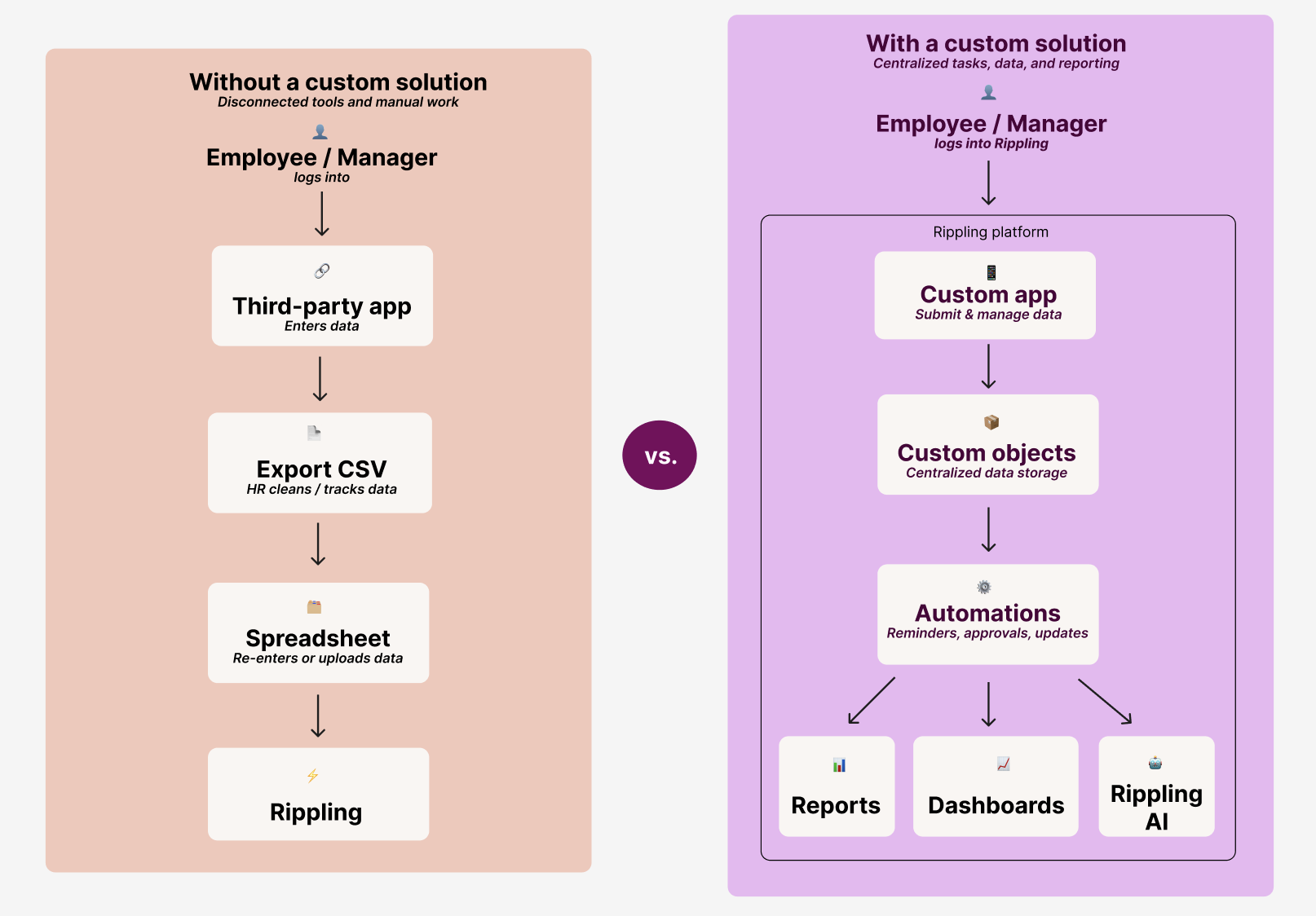
Because custom solutions are built from the same core tools, you can mix and match capabilities to address a wide range of use cases, such as:
- Creating a custom app for tip pooling across specific departments
- Automating onboarding flows for new hires
- Creating a custom app for expense reporting
- Automating pay and contracts across multiple locations
If you want assistance building a custom solution that meets your specific business needs, the Rippling Solutions team can provide assistance. See Rippling Solutions for more information.
How do Rippling's tools work together to manage data?
Rippling's platform is made up of individual tools, such as pipelines, automation, and custom apps, that each handle a specific job. On their own, these tools are powerful. But a custom solution is what happens when you connect them: data flows from an external source into Rippling, gets shaped and stored, triggers automated actions, and ultimately surfaces in a place where your employees can interact with it.
Tools at a glance:
- Bring data in: Pipelines, Functions
- Store data: Custom Objects
- Shape and clean data: Transformations
- Trigger automated actions: Automations
- Surface and interact with data: Rippling AI, custom apps, Reports, Dashboards
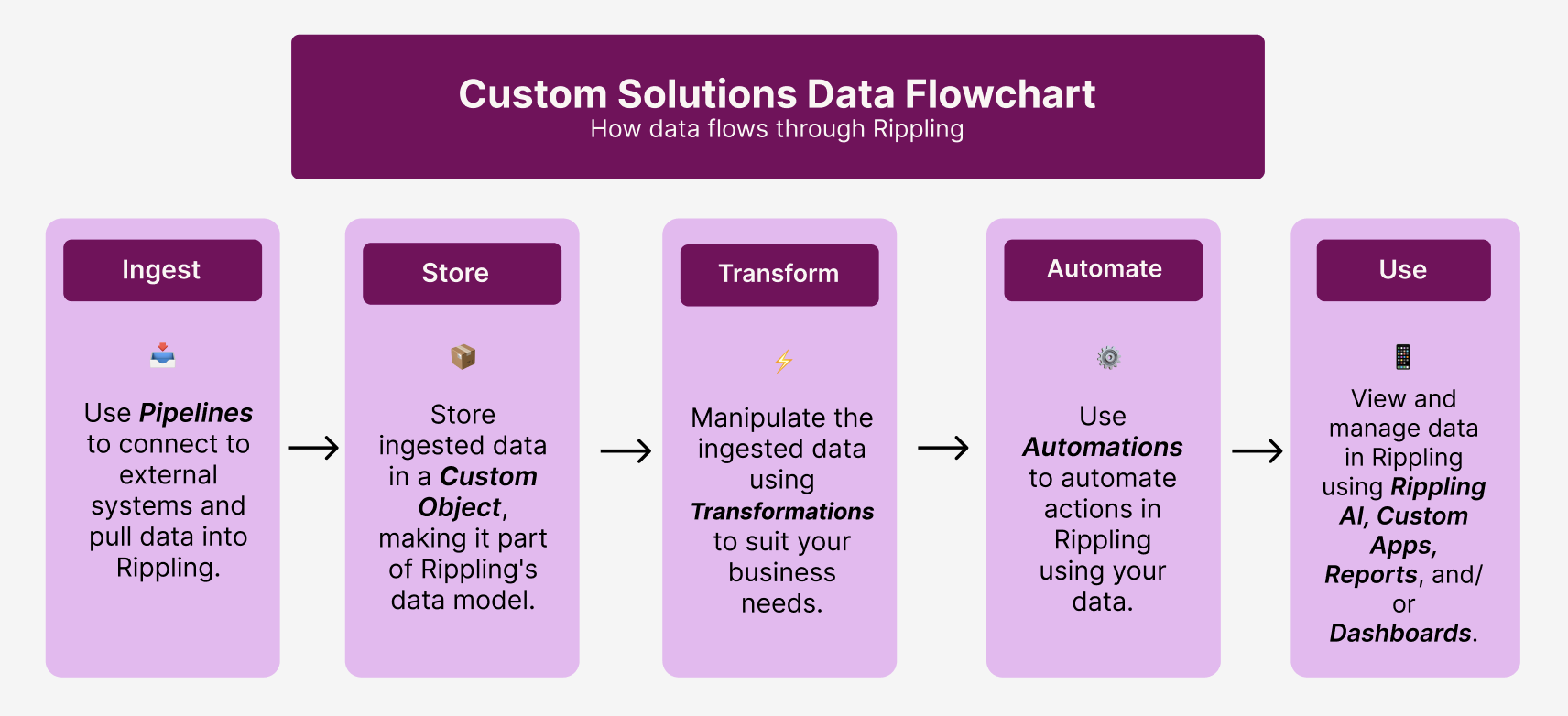
The diagram below shows a standard custom solutions data flow from start to finish. Think of it like a recipe: the ingredients are the external data sources, the steps are the Rippling tools, and the finished dish is a custom app, report, or dashboard that can be used/managed in Rippling.
Build a solution
Using another example, say your HR team uses a third-party system to manage employee performance reviews. Managers submit reviews in that system, while HR exports the data into spreadsheets to track completion rates and analyze performance trends.
By building a custom solution, you can bring that review data into Rippling, store and organize it, automate reminders for managers, and create a custom app where reviews are completed and tracked directly. This allows HR to manage performance cycles, run reports, and analyze data in one centralized place.
To build this solution, you'll move through a series of steps: ingesting data from the external system, storing it in custom objects, transforming it as needed, automating actions, and finally surfacing it in a custom app, automation, or report.
Ingest
Bring data into Rippling using the Pipelines app, which supports custom pipelines and Functions. Pipelines are a way to configure and manage connections to bring data into Rippling from outside sources.
Pipelines
Pipelines require a subscription to Rippling AI.
Custom pipelines connect to any external system with a publicly available API. You can build them with no-code configuration or functions (JavaScript), or with help from Rippling Solutions.
Once ingested, this data is available across Rippling for analytics, automations, and custom apps. With data in Rippling, you can control access using role-based permissions and Supergroups. This ensures the right employees can securely view and interact with the correct data, without relying on external systems.
Because custom pipelines interact directly with external APIs, you should familiarize yourself with the provider's API documentation (specifically authentication, endpoints, rate limits, and response schemas) before building.
Learn more in Get started with pipelines and Set up a custom pipeline.
Functions
Functions require a subscription to Rippling Platform Pro, 10-pack of custom apps (App Studio), or unlimited custom apps (App Studio).
Functions are custom JavaScript code written by you, but stored, deployed, and run in Rippling. They let you build custom logic and actions across a wide range of use cases, for example, automating a signup flow in a custom app, powering a data ingestion pipeline, or calling a Rippling Platform API endpoint.
You can invoke functions from multiple places across the platform:
- Custom pipelines: Create a function that can be added within a custom pipeline.
- Custom object actions: Trigger functions from buttons in custom app tables or record views, passing one or more record IDs as input.
- Custom app components: Connect functions to UI components in App Studio, triggering them on user interaction or page load, with support for dynamic inputs and UI responses.
- Automations: Run functions as steps in Automation Studio to automate execution, chain multiple functions together, and use function outputs in later steps.
Learn more in Get started with functions.
Store
Store the ingested data in a custom object.
Custom Objects
Custom objects require a subscription to Rippling Platform Pro.
A custom object is a container in Rippling that stores the ingested data. Custom objects become part of the underlying data model in Rippling, called the employee graph. You can use the data stored in custom objects in the same ways you would any of the native data in Rippling, tailoring the platform to your company's unique needs.
| Examples of Rippling objects | Examples of custom objects |
|---|---|
| Employee | License |
| Device | Regulatory body |
| Device order | Client |
| Company pay run | Invoice |
| Employee pay run | Project |
| Job requisition | Incident |
You can track any data in Rippling by adding it as a custom object, whether for analytics, process automation, or consolidating everything into a single source of truth.
By default, custom objects created by custom pipelines are saved under the name of the pipeline in Data > Catalog. If desired, you'll be able to select a different category when configuring the pipeline.
Learn more in Set up a custom pipeline, Get Started with the Rippling Data Model, and Custom objects overview.
Transform
Manipulate the ingested data using the Transformations app. Some common use cases for manipulating data with transformations are:
- Standardizing inconsistent data formats: External systems may store data differently (e.g., job titles like "Sr. Manager" vs. "Senior Manager"). Transformations help normalize values so reporting is consistent.
- Converting data types and formats: Data may come in as text, timestamps, or other formats that aren't immediately usable. Transformations allow you to convert values into the correct format for analysis (e.g., readable dates or numeric fields).
- Handling currency or unit conversions: If you're ingesting compensation or expense data from multiple countries, transformations can convert currencies into a single standard for accurate reporting.
- Joining data from multiple sources: Combine external data (e.g., performance reviews or training records) with Rippling employee data to create a more complete dataset.
- Creating calculated fields: Generate new fields such as tenure, performance scores, or total compensation based on existing data.
Transformations
Transformations require a subscription to Rippling Data Cloud or Rippling AI.
Use the Transformations app to write SQL that cleans up and normalizes your ingested data, joins it with other datasets, creates new fields, or optimizes for speed, and then saves the transformed data as new objects in Rippling.
Learn more in Get started with transformations and our SQL Reference Glossary.
Automate
Streamline operations across your organization using automations.
Automations require a subscription to Rippling Platform.
Automations are the workflow engine within Rippling, enabling you to automate a wide range of actions like sending emails or Slack messages, submitting bonuses to payroll, sending surveys, or assigning reviews.
You can also use your Rippling data to define trigger events that initiate an automation, such as:
- Records changing: When a performance review status changes to "completed," automatically notify HR and update a tracking report.
- An employee being hired: When a new employee is hired, trigger onboarding tasks such as sending welcome emails, assigning training, and enrolling them in benefits.
- An external event (e.g. a deal closing in Salesforce): When a deal is marked as closed in Salesforce, trigger a bonus payout or commission calculation in Rippling.
- A field meeting a condition: When an employee's certification is nearing expiration, send reminders and notify their manager.
Once triggered, automations can pass relevant data through a series of automated steps, ensuring the right actions happen at the right time without manual intervention.
Learn more in Get started with automations.
Interact
Interact with and use the manipulated data with Rippling AI, custom apps, Reports, and/or Dashboards.
Rippling AI
Rippling AI requires a Rippling AI subscription.
With Rippling AI, you can interact with your company's live data through natural language - asking questions, building reports, and taking action without navigating menus or writing queries. From payroll discrepancies to headcount planning, anything that requires pulling records, comparing numbers, or executing automations can be surfaced, analyzed, and acted on directly in a conversational interface.
Learn more in Get started with Rippling AI.
Custom apps
Custom apps require a subscription to Rippling Platform Pro.
With Custom Apps, you can interact with a front-end UI to view and manage most components of the end-to-end automation. From safety incident tracking to unique payroll integrations, anything that requires a spreadsheet can be automated and managed with a custom app.
Learn more in Get started with custom apps.
Reports
Reports require a subscription to Rippling AI.
Reports let you analyze and view your data in a structured, highly-customizable format. You can build reports using data from custom objects, transformations, and Rippling's core data model to address specific business questions.
For more information, see Get started with reports.
Dashboards
Dashboards require a subscription to Rippling AI.
Dashboards let you combine metrics and share them with people across your company. For example, ingest project assignments, bill rates, and client details from Salesforce and join it with your employee data in Rippling to create a consulting project tracking dashboard.
For more information, see Get started with dashboards.