

Overview
Rippling integrations rely on OAuth 2.0, in which Rippling is the server and your application is the client. At a high-level, Rippling will send the user to your redirect URL with a ?code=<xxx> parameter when they install your application in Rippling. This provides the authorization that your application will utilize to exchange for access and refresh tokens.
Requirements
To understand the installation flow requirements expected from apps in the Rippling App Shop, see our Partner Requirements.
Installation flow
To begin, navigate to your Login URL and then navigate to your App Shop Listing URL as your app will not yet be discoverable from the App Shop.
Please use the following URLs for your apps:
| Purpose | URL |
|---|---|
| Login URL | https://app.rippling.com |
| App Shop Listing URL | https://app.rippling.com/app-shop/app/{APPNAME} |
| App Authorize URL | https://app.rippling.com/apps/PLATFORM/{APPNAME}/authorize |
| API Base URL | https://api.rippling.com |
| API Token URL | https://api.rippling.com/api/o/token/ |
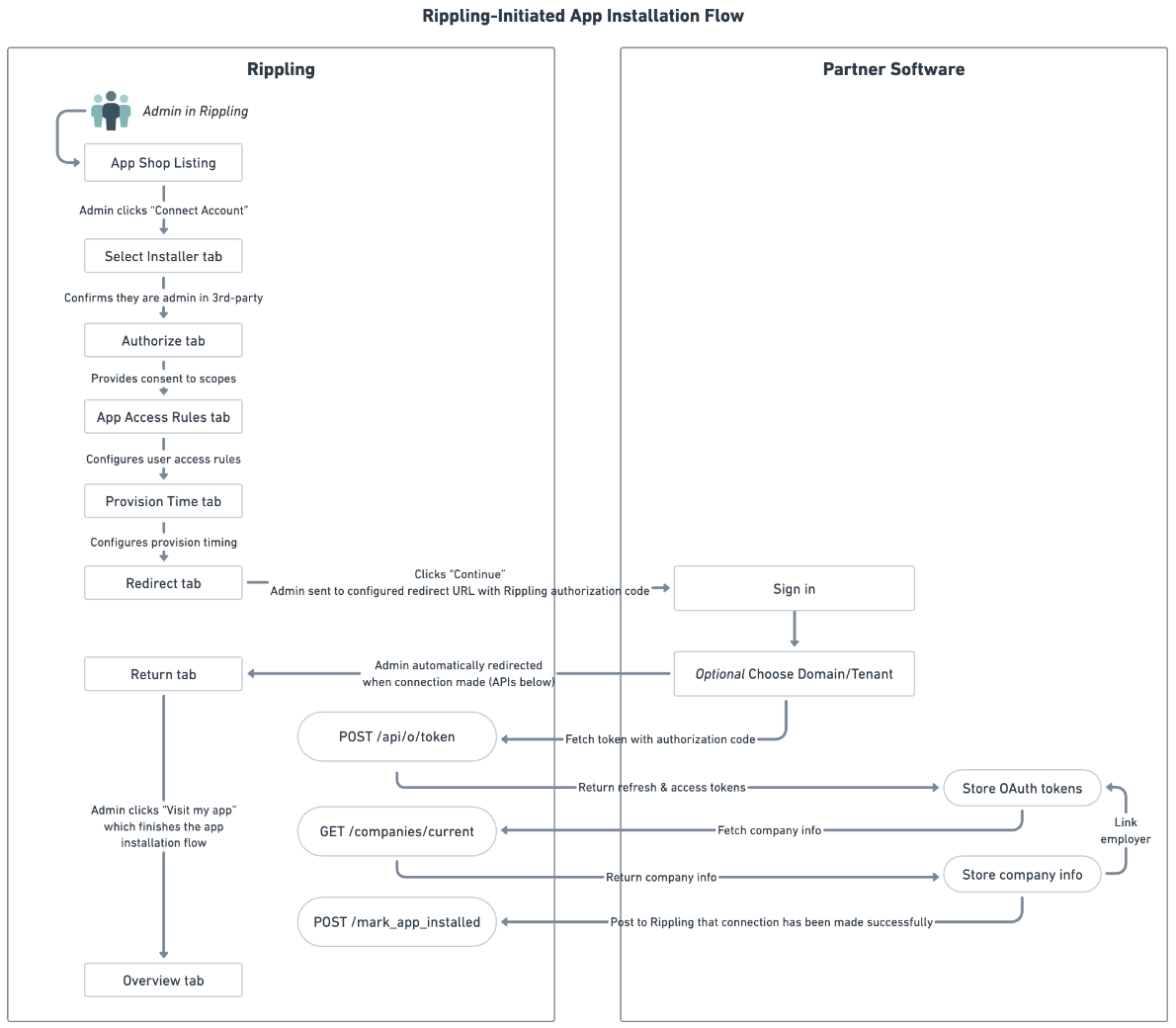
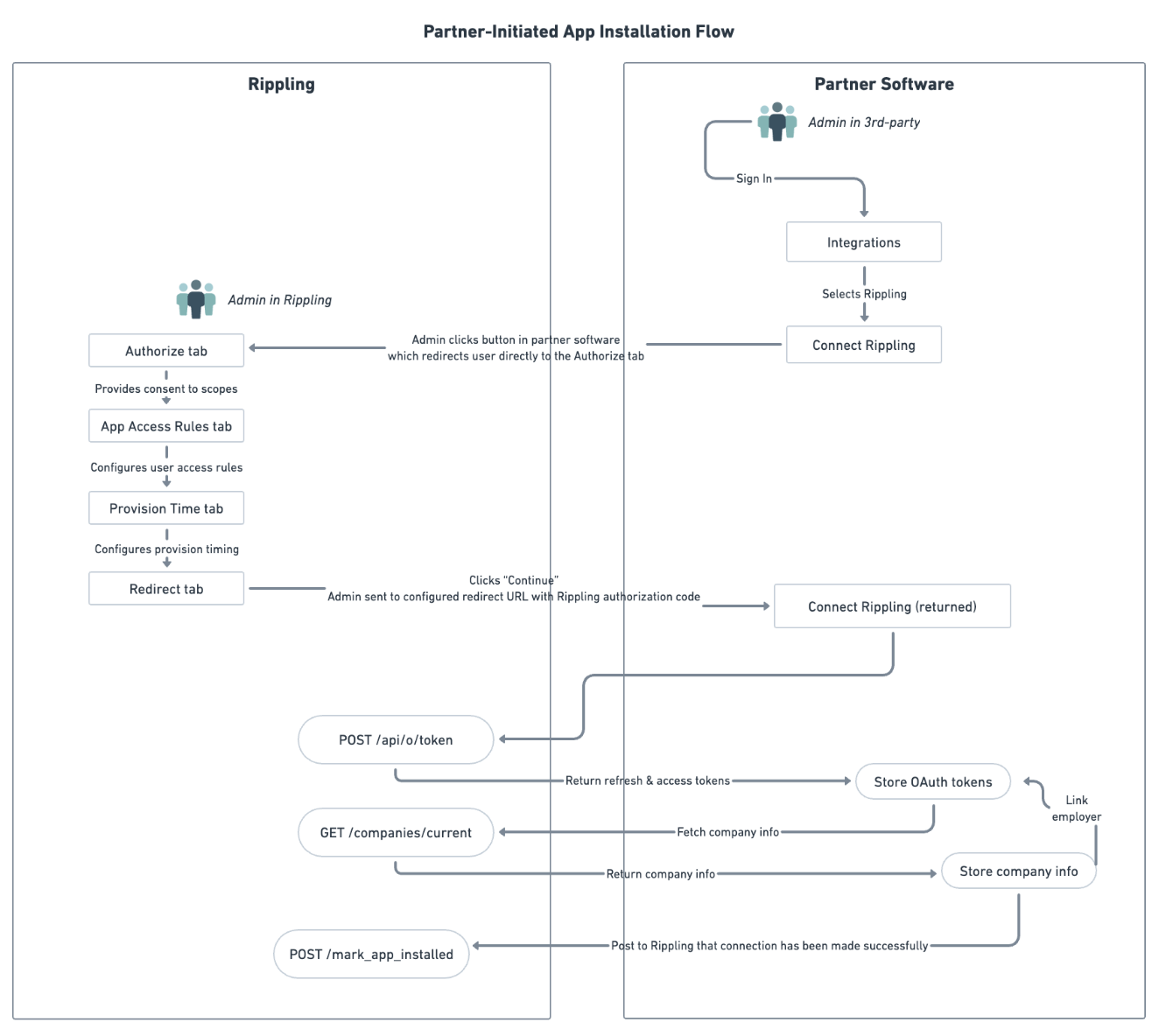
Initial redirect
As you go through the setup flow, you will be redirected to the redirect URL that you configured in the Default Redirect URL field in your app listing. The following query parameters will be present in the redirect:
| Redirect Query Parameter | Description |
|---|---|
| code | OAuth code that can be exchanged for an access token. |
| buy | A boolean value based on whether the user indicated they are purchasing a new account, or connecting an existing account. |
| redirect_uri | The URL on Rippling that the user should be sent back to once the OAuth setup is done. |
Please note: Rippling will only use redirect URIs that have already been configured in your app. Rippling will not redirect to any URL that is passed as a parameter unless it has been configured as an additional redirect URL in your app listing.
Using the code value, your server will be able to get an access token from Rippling.
Once the user has been redirected from Rippling to your application, the authorization code is valid for 300 seconds. The authorization code must be used to redeem an access token within 300 seconds of the code being issued. If an access token is not redeemed with this authorization code by then, the user will need to Redirect from Rippling again.
Rippling will redirect to your redirect URL with an authorization code. The redirect will look like this:
https://oauth.pstmn.io/v1/callback?code=kThqQg24SmDr3Z3XV6oo2CgpC03ysS2M&redirect_uri=https%3A%2F%2Fapp.rippling.com%2Fapps%2FPLATFORM%2FPortalTest%2Freturn&buy=false
- The
redirect_uriis the URL that you must return the user to in Rippling to complete the app installation flow.
The authorization code should be not be grabbed directly from the URL link after the redirect. It should be extracted using server-side code (outside of Rippling) to securely capture and handle the authorization code.
If you need to quickly get another authorization code with your test company, you can go directly to the Redirect URL for your app (replace INSERTAPPNAME with your app name) and then click the Continue button:
https://app.rippling.com/apps/PLATFORM/INSERTAPPNAME/redirect
When the user is redirected from Rippling to your app, that user should then sign in to the app. This allows you to identify the account and associate the code with their account. The redirect URL that you receive from Rippling is where you should redirect the user back to following the user signing into the application.
Retrieving an access token
To retrieve the access token, your server will need to make a POST request to the API Token URL. The POST request should include a basic auth header with base64 encoded clientid:clientsecret, along with the following parameters:
| Auth Query Parameters | Description |
|---|---|
| grant_type | authorization_code |
| code | OAuth code that was sent in the redirect. |
| redirect_uri | Your redirect URL. This must match the redirect URL you had provided to Rippling. |
Example request:
curl "https://api.rippling.com/api/o/token/" -X POST -H "Authorization: Basic REDACTED" -F "grant_type=authorization_code" -F "code=INSERTAUTHORIZATIONCODE" -F "redirect_uri=https://example.com"
-
The
REDACTEDshould be replaced with Base64 encoding of theclient_id:client_secretstring in the request header. -
The
INSERTAUTHORIZATIONCODEshould be replaced with the authorization (OAuth) code that Rippling returns in thecodeparameter after the redirect from Rippling to your application . -
The
https://example.comshould be replaced with your redirect URL that has already been configured in your Rippling app.
Example response:
{
  "access_token": "REDACTED",
  "token_type": "Bearer",
  "expires_in": 129600,
  "refresh_token": "REDACTED",
  "scope": "employee:workEmail employee:name"
}
When you receive an access token from Rippling, the payload will also include an expires_in output. The expires_in value is based in seconds and informs you of when your access token will expire. For example, if your access token response includes expires_in: 129600 then this means the access token you received has a duration of 129,600 seconds.
Access tokens grant access to Rippling APIs for each company. One Access Token will give access to one Rippling Company. So if twelve Rippling companies have installed your app, then twelve Access Tokens will need to be used.
Mark app as installed
After the installation flow is completed and the user is directed back to Rippling, you will call POST Mark App Installed to finalize the installation.
Example request:
curl -L -X POST 'https://api.rippling.com/platform/api/mark_app_installed' \
-H 'Accept: application/json' \
-H 'Authorization: Bearer REDACTED
Example response:
{
  "ok": true
}
Refresh tokens
To retrieve a Refresh Token, send a POST request to the same API Token URL with basic auth and your client ID and secret and the following form parameters:
| Refresh Query Parameters | Description |
|---|---|
| grant_type | refresh_token |
| refresh_token | Refresh token from the initial grant. |
Example request:
curl "https://api.rippling.com/api/o/token/" -X POST -H "Authorization: Basic REDACTED" -F "grant_type=refresh_token" -F "refresh_token=INSERTFREFRESHTOKEN"
-
The
REDACTEDshould be replaced with Base64 encoding of theclient_id:client_secretstring in the request header. -
The
INSERTFREFRESHTOKENshould be replaced with your existing refresh token.
Linking the OAuth tokens with the Rippling company
Now that the connection has been made, your server should request the company information. This information can then be matched with your application's internal database so that you can link the tokens with the corresponding Rippling Company.
Current company
Retrieve the current company's information with the GET List Companies endpoint. Note, the fields returned will depend on the scopes the customer has authorized your service to access.
Request
curl --location --request GET 'https://rest.ripplingapis.com/companies' \
--header 'Authorization: Bearer REDACTED'
Response
{
    "id": "595f75ffd2a5f80ae22ce88e",
    "ein": "123121111",
    "address": {
        "city": "San Francisco",
        "state": "CA",
        "country": "US",
        "zip": "94110",
        "streetLine1": "3000 Mission Street"
    },
    "workLocations": [
        {
            "id": "5984bca87ee766438fd6faa5",
            "nickname": "SF",
            "address": {
                "city": "Salem",
                "zip": "97317",
                "streetLine1": "4000 Mission Street Southeast",
                "country": "US",
                "state": "OR",
                "steLocationCode": {
                    "cityCode": "0004491020",
                    "psdCode": "",
                    "schoolCode": "",
                    "countyCode": "047",
                    "stateCode": "41",
                    "municipalityCode": "",
                    "transitDistrictCode": "",
                    "locationCode": "41-047-0004491020"
                }
            }
        }
    ],
    "primaryEmail": "aamir+prod@rippling.com",
    "phone": "9892471335",
    "name": "Bob's Bakery"
}
FAQs
If you're a partner seeking answers or encountering difficulties while integrating with Rippling, please contact us at partner.support@rippling.com. Ensure our responses reach you by preventing emails from this address from being filtered into your spam folder.