Overview
A custom object stores structured data in Rippling. Custom objects become part of the Rippling data model and can be used like native Rippling data. Custom objects have four main components: categories, objects, fields, and records.
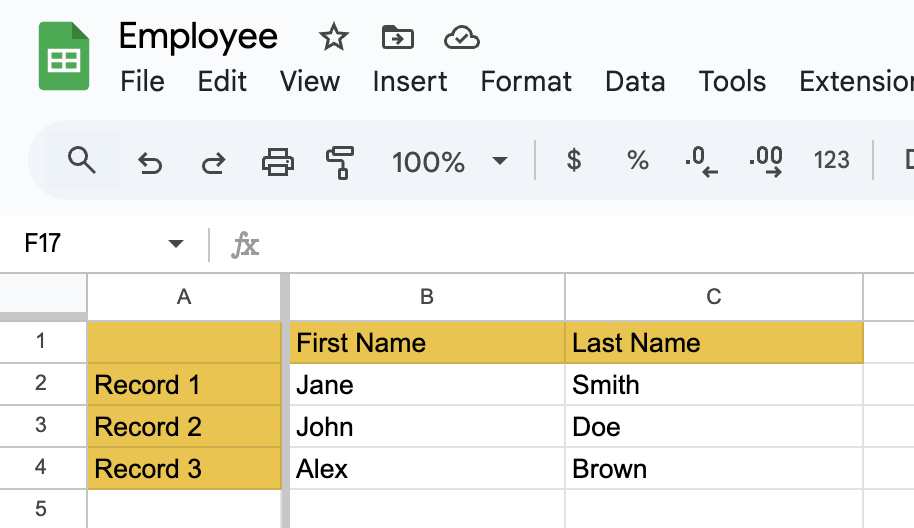
A custom object and its data can be likened to a spreadsheet:
- The sheet and all the data it contains is the object model and database (“Employee”).
- Each column header is a field, or attribute within the object (“First Name”).
- Each row (or record) in the sheet is a unique instance of the object ("Jane Smith", "John Doe”, “Alex Brown”).
- A custom object category can house multiple custom objects and their associated data (the category "HRIS" contains multiple spreadsheets: "Employee", "Payroll").
Available endpoints
| Endpoint | Description |
|---|---|
| GET List object categories | Lists custom object categories. Use id as category when creating an object. |
| POST Create a new object category | Creates a category. name is required. |
| PATCH Update an object category | Updates a category by id. |
| DELETE Delete an object category | Deletes a category by id. |
| GET List custom objects | Lists custom objects. Use api_name as custom_object_api_name on field and record calls. |
| POST Create a new custom object | Creates a custom object. name and category are required. |
| PATCH Update a custom object | Updates a custom object by api_name. |
| DELETE Delete a custom object | Deletes a custom object by api_name. |
| GET List custom object fields | Lists fields on a custom object. Use api_name as field_api_name. |
| POST Create a new custom object field | Creates a field. name and data_type are required. |
| PATCH Update a custom object field | Updates a field by field_api_name. |
| DELETE Delete a custom object field | Deletes a field by field_api_name. |
| GET List custom object records | Lists records on a custom object. Use id as codr_id. |
| POST Create a new custom object record | Creates a record. name is required. |
| POST List custom object records by query | Lists records that match a query. query is required. |
| PATCH Update a custom object record | Updates a record by codr_id. |
| DELETE Delete a custom object record | Deletes a record by codr_id. |
Suggested workflow
- List object categories or create a category when you need a new one. Keep the category
id. - Create a custom object with that
idascategory. Keep the returnedapi_name. - List fields on that object then create any additional fields.
- Create records. For
owner_role, use a workeridfrom GET List workers. - List records or query records to confirm what was written.
- Update or delete a category, object, field, or record with the
id,api_name,field_api_name, orcodr_idfrom the earlier responses.
Requirements
- The Rippling API SKU
- An API token with the following scopes:
custom-objects.readto list custom objectscustom-objects.read-writeto list and manage custom objectscustom-object-records.readto list custom object recordscustom-object-records.read-writeto list and manage custom object records
Fetch
Categories
Use GET List object categories to return a paginated list of all custom object categories within a company.
Request:
curl -L -X GET 'https://rest.ripplingapis.com/object-categories/'
-H 'Accept: application/json'
-H 'Authorization: Bearer REDACTED'
Response:
{
  "results": [
    {
      "id": "6849d08071a964c196e3f6f4",
      "created_at": "2025-06-11T18:52:48.788000+00:00",
      "updated_at": "2026-02-06T23:20:46.484000+00:00",
      "name": "Custom object",
      "description": "Default category for custom objects"
    },
    {
      "id": "6926d6e1f48b09c1aa1495e3",
      "created_at": "2025-11-26T10:30:57.703000+00:00",
      "updated_at": "2025-11-26T10:30:57.703000+00:00",
      "name": "Job Dimensions",
      "description": "Contains Jobs related Organisational data"
    }
  ],
  "next_link": null
}
Objects
Use GET List custom objects to return a paginated list of all custom objects within a company.
Request:
curl -L -X GET 'https://rest.ripplingapis.com/custom-objects/'
-H 'Accept: application/json'
-H 'Authorization: Bearer REDACTED'
Response:
{
  "results": [
    {
      "id": "6849d307154911bfc2ac5863",
      "created_at": "2025-06-11T19:03:35.703000+00:00",
      "updated_at": "2025-06-11T19:03:35.704000+00:00",
      "name": "Licenses",
      "description": null,
      "api_name": "licenses_1__c",
      "plural_label": "Licenseses",
      "category_id": "6849d08071a964c196e3f6f4",
      "native_category_id": null,
      "managed_package_install_id": null,
      "enable_history": false,
      "owner_id": "6569928dfb7bc7c3510f3f14"
    }
  ],
  "next_link": null
}
Fields
Use GET List custom object fields to return a paginated list of all fields within a custom object. Call GET List custom objects (api_name) for custom_object_api_name.
Request:
curl -L -X GET 'https://rest.ripplingapis.com/custom-objects/licenses_1__c/fields/'
-H 'Accept: application/json'
-H 'Authorization: Bearer REDACTED'
Response:
{
  "results": [
    {
      "id": "6849d307154911bfc2ac5867",
      "created_at": "2025-06-11T19:03:35.792000+00:00",
      "updated_at": "2025-06-11T19:03:35.792000+00:00",
      "name": "ID",
      "custom_object": "6849d307154911bfc2ac5863",
      "description": "The Rippling ID of a record",
      "api_name": "id",
      "data_type": {
        "field_type": "TEXT",
        "options_list": [],
        "supported_types": [],
        "og_model_rql_name": null,
        "db_model_name": null,
        "related_data_label": null,
        "lookup_filter_rql_condition": null,
        "lookup_filter_rql_meta": null,
        "has_lookup_filter_rql_perm": null,
        "custom_object_id": null,
        "custom_object_pgsql_id": null,
        "edge_type": null,
        "parent_child_type": null,
        "enable_parent_owner_inheritance": null,
        "currency": null,
        "num_of_decimal_places": null,
        "is_other_enabled": null,
        "max_length": 500,
        "reference_column_storage_type": null,
        "detailed_options_list": null
      },
      "is_unique": true,
      "is_immutable": true,
      "is_standard": true,
      "managed_package_install_id": null,
      "enable_history": false
    }
  ],
  "next_link": null
}
Records
Use GET List custom object records to return a paginated list of all custom object records contained within a custom object. Call GET List custom objects (api_name) for custom_object_api_name.
Request:
curl -L -X GET 'https://rest.ripplingapis.com/custom-objects/licenses_1__c/records/'
-H 'Accept: application/json'
-H 'Authorization: Bearer REDACTED'
Response:
{
  "results": [
    {
      "id": "019c4efd-a27c-78ff-aeb2-7ee4becbf614",
      "updated_at": "2026-02-11T23:16:11.004Z",
      "created_at": "2026-02-11T23:16:11.004Z",
      "created_by": {
        "id": "6569928dfb7bc7c3510f3f14",
        "display_value": "Jane Smith",
        "image": ""
      },
      "external_id": null,
      "last_modified_by": {
        "id": "6569928dfb7bc7c3510f3f14",
        "display_value": "Jane Smith",
        "image": ""
      },
      "name": "License 1",
      "owner_role": {
        "id": "6569928dfb7bc7c3510f3f14",
        "display_value": "Jane Smith",
        "image": ""
      },
      "system_updated_at": "2026-02-11T23:16:11.004Z"
    }
  ],
  "next_link": null
}
Create
Categories
Use POST Create a new object category to create a new custom object category.
Request:
curl -L -X POST 'https://rest.ripplingapis.com/object-categories/'
-H 'Accept: application/json'
-H 'Content-Type: application/json'
-H 'Authorization: Bearer REDACTED'
Request body:
{
  "name": "Yoga classes",
  "description": "Yoga classes"
}
| Request body field | Description |
|---|---|
name | The name of the new custom object category. |
description | A description of the new custom object category. |
Response:
{
  "id": "698d12f43550b65258fad361",
  "created_at": "2026-02-11T23:38:28.902000+00:00",
  "updated_at": "2026-02-11T23:38:28.902000+00:00",
  "name": "Yoga classes",
  "description": "Yoga classes"
}
Objects
Use POST Create a new custom object to create a new custom object. Call GET List object categories for category_id.
Request:
curl -L -X POST 'https://rest.ripplingapis.com/custom-objects/'
-H 'Accept: application/json'
-H 'Content-Type: application/json'
-H 'Authorization: Bearer REDACTED'
Request body:
{
  "name": "Driver's License Expiration",
  "description": "The date of expiration associated with our drivers and their licenses.",
  "category": "6849d08071a964c196e3f6f4"
}
| Request body field | Description |
|---|---|
name | Object name. |
description | Object description. |
category | The category the custom object will be housed under (corresponds to id from GET List object categories). |
Response:
{
  "id": "68797c92b4e9bbdd69b50642",
  "created_at": "2025-07-17T22:43:30.386000+00:00",
  "updated_at": "2025-07-17T22:43:30.386000+00:00",
  "name": "Driver's License Expiration",
  "description": "The date of expiration associated with our drivers and their licenses.",
  "api_name": "drivers_license_expiration__c",
  "plural_label": "Driver's License Expirations",
  "category_id": "6849d08071a964c196e3f6f4",
  "native_category_id": null,
  "managed_package_install_id": null,
  "enable_history": false,
  "owner_id": "6569928dfb7bc7c3510f3f14"
}
Fields
Use POST Create a new custom object field to create a new field within a custom object. Call GET List custom objects (api_name) for custom_object_api_name.
Request:
curl -L -X POST 'https://rest.ripplingapis.com/custom-objects/licenses_1__c/fields/'
-H 'Accept: application/json'
-H 'Content-Type: application/json'
-H 'Authorization: Bearer REDACTED'
Request body:
{
    "name": "Subject",
    "description": "License 1",
    "data_type": {
      "field_type": "TEXT",
      "max_length": 200
    },
    "required": true
}
| Request body field | Description |
|---|---|
name | Field type definition (e.g. text/number/date/reference). |
description | A description of the new custom object. |
required | If true, records must provide a value. |
rql_definition | Advanced config for RQL-based/computed fields. |
is_unique | If true, values must be unique across records. |
formula_attr_metas | Advanced metadata for formula fields. |
section | UI section/grouping metadata (advanced/optional). |
enable_history | Track value changes over time for this field. |
derived_field_formula | Formula expression for derived field values. |
derived_aggregated_field | Advanced config for aggregated derived fields. |
Response:
{
  "name": "Subject",
  "api_name": "subject__c",
  "data_type": {
    "field_type": "TEXT",
    "max_length": 200
  },
  "is_unique": false,
  "enable_history": false
}
Records
Use POST Create a new custom object record to create a new record within a custom object. Call GET List custom objects (api_name) for custom_object_api_name.
Request:
curl -L -X POST 'https://rest.ripplingapis.com/custom-objects/licenses_1__c/records/'
-H 'Accept: application/json'
-H 'Content-Type: application/json'
-H 'Authorization: Bearer REDACTED'
Request body:
{
  "name": "License 4",
  "external_id": "license_4",
  "owner_role": "6569928dfb7bc7c3510f3f14"
}
| Request body field | Description |
|---|---|
name | The name of the new custom object record. |
external_id | Optional unique external identifier. |
owner_role | Optional owner role/user ID (fetched from GET List Workers). |
Response:
{
  "data": {
    "id": "019c6ccd-5732-779d-bcb8-e6eb3db91038",
    "updated_at": "2026-02-17T18:12:02.431Z",
    "created_at": "2026-02-17T18:12:02.431Z",
    "created_by": {
      "id": "6569928dfb7bc7c3510f3f14",
      "display_value": "Jane Smith",
      "image": ""
    },
    "external_id": "license_4",
    "last_modified_by": {
      "id": "6569928dfb7bc7c3510f3f14",
      "display_value": "Jane Smith",
      "image": ""
    },
    "name": "License 4",
    "owner_role": {
      "id": "6569928dfb7bc7c3510f3f14",
      "display_value": "Jane Smith",
      "image": ""
    },
    "system_updated_at": "2026-02-17T18:12:02.431Z"
  },
  "breaking_errors": [],
  "write_errors": []
}
Use POST List custom object records by query to create a new custom object record by query. Call GET List custom objects (api_name) for custom_object_api_name.
Request:
curl -L -X POST 'https://rest.ripplingapis.com/custom-objects/licenses_1__c/records/query/'
-H 'Accept: application/json'
-H 'Content-Type: application/json'
-H 'Authorization: Bearer REDACTED'
Request body:
{
  "query": "id != null",
  "limit": 500
}
Response:
{
  "results": [
    {
      "id": "019c4efd-a27c-78ff-aeb2-7ee4becbf614",
      "updated_at": "2026-02-11T23:16:11.004Z",
      "created_at": "2026-02-11T23:16:11.004Z",
      "created_by": {
        "id": "6569928dfb7bc7c3510f3f14",
        "display_value": "Jane Smith",
        "image": ""
      },
      "external_id": null,
      "last_modified_by": {
        "id": "6569928dfb7bc7c3510f3f14",
        "display_value": "Jane Smith",
        "image": ""
      },
      "name": "License 1",
      "owner_role": {
        "id": "6569928dfb7bc7c3510f3f14",
        "display_value": "Jane Smith",
        "image": ""
      },
      "system_updated_at": "2026-02-11T23:16:11.004Z"
    }
  ],
  "cursor": null
}
Update
Categories
Use PATCH Update a object category to update an existing custom object category. Call GET List object categories for the object category id.
Request:
curl -L -X PATCH 'https://rest.ripplingapis.com/object-categories/6926d6e1f48b09c1aa1495e3/'
-H 'Accept: application/json'
-H 'Content-Type: application/json'
-H 'Authorization: Bearer REDACTED'
Request body:
{
  "name": "Jobs and dimensions",
  "description": "change"
}
Response:
{
  "id": "6926d6e1f48b09c1aa1495e3",
  "created_at": "2025-11-26T10:30:57.703000+00:00",
  "updated_at": "2026-02-11T23:42:41.481000+00:00",
  "name": "Jobs and dimensions",
  "description": "change"
}
Object
Use PATCH Update a custom object to update an existing custom object. Call GET List custom objects to obtain the field information needed.
Field mapping:
| GET List custom objects | PATCH Update a custom object |
|---|---|
custom_object_api_name | api_name |
name | name |
description | description |
category | category_id |
plural_label | plural_label |
owner_role | owner_id |
Request:
curl -L -X PATCH 'https://rest.ripplingapis.com/custom-objects/drivers_license_expiration__c/'
-H 'Accept: application/json'
-H 'Content-Type: application/json'
-H 'Authorization: Bearer REDACTED'
Request body:
{
  "name": "Driver's License Expiration Date",
  "description": "The date of expiration associated with our drivers and their licenses.",
  "category": "6849d08071a964c196e3f6f4",
  "plural_label": "Driver's License Expirations",
  "owner_role": "6569928dfb7bc7c3510f3f14"
}
Response:
{
  "id": "68797c92b4e9bbdd69b50642",
  "created_at": "2025-07-17T22:43:30.386000+00:00",
  "updated_at": "2025-07-17T22:48:46.063000+00:00",
  "name": "Driver's License Expiration Date",
  "description": "The date of expiration associated with our drivers and their licenses.",
  "api_name": "drivers_license_expiration__c",
  "plural_label": "Driver's License Expirations",
  "category_id": "6849d08071a964c196e3f6f4",
  "native_category_id": null,
  "managed_package_install_id": null,
  "enable_history": false,
  "owner_id": "6569928dfb7bc7c3510f3f14"
}
Fields
Use PATCH Update a custom object field to update a field within a custom object. Call GET List custom objects (api_name) for custom_object_api_name and GET List custom object fields (api_name) for field_api_name.
Request:
curl -L -X PATCH 'https://rest.ripplingapis.com/custom-objects/support_ticket__c/fields/'
-H 'Accept: application/json'
-H 'Content-Type: application/json'
-H 'Authorization: Bearer REDACTED'
Request body:
{
    "name": "Hours Spent",
    "description": "Time spent resolving this ticket",
    "data_type": {
      "field_type": "NUMBER",
      "num_of_decimal_places": 1
    }
  }'
Response:
{
  "name": "Hours Spent",
  "api_name": "hours_spent__c",
  "data_type": {
    "field_type": "NUMBER",
    "num_of_decimal_places": 1
  }
}
Records
Use PATCH Update a custom object record to update a record within a custom object. Call GET List custom objects (api_name) for custom_object_api_name and GET List custom object records (id) for codr_id.
Request:
curl -L -X PATCH 'https://rest.ripplingapis.com/custom-objects/licenses_1__c/records/019c4efd-a27c-78ff-aeb2-7ee4becbf614/'
-H 'Accept: application/json'
-H 'Content-Type: application/json'
-H 'Authorization: Bearer REDACTED'
Request body:
{
  "name": "License 5",
  "external_id": "license_5",
  "owner_role": "6569928dfb7bc7c3510f3f14"
}
Response:
{
  "data": {
    "id": "019c4efd-a27c-78ff-aeb2-7ee4becbf614",
    "updated_at": "2026-02-17T18:15:28.592Z",
    "created_at": "2026-02-11T23:16:11.004Z",
    "created_by": {
      "id": "6569928dfb7bc7c3510f3f14",
      "display_value": "Jane Smith",
      "image": ""
    },
    "external_id": "license_5",
    "last_modified_by": {
      "id": "6569928dfb7bc7c3510f3f14",
      "display_value": "Jane Smith",
      "image": ""
    },
    "name": "License 5",
    "owner_role": {
      "id": "6569928dfb7bc7c3510f3f14",
      "display_value": "Jane Smith",
      "image": ""
    },
    "system_updated_at": "2026-02-17T18:15:28.592Z"
  },
  "breaking_errors": [],
  "write_errors": []
}
Delete
Categories
Use DELETE Delete an object category to delete a specific object category by ID.
Request:
curl -L -X DELETE 'https://rest.ripplingapis.com/object-categories/69c2e83d1834815ab63989bc/'
-H 'Accept: application/json'
-H 'Authorization: Bearer REDACTED'
A successful delete returns 204 and no body.
Objects
Use DELETE Delete a custom object to delete a custom object by ID.
Request:
curl -L -X DELETE 'https://rest.ripplingapis.com/custom-objects/employees/'
-H 'Accept: application/json'
-H 'Authorization: Bearer REDACTED'
A successful delete returns 204 and no body.
Fields
Use DELETE Delete a custom object field to delete a custom object field by ID.
Request:
curl -L -X DELETE 'https://rest.ripplingapis.com/custom-objects/employees/'
-H 'Accept: application/json'
-H 'Authorization: Bearer REDACTED'
A successful delete returns 204 and no body.
Records
Use DELETE Delete a custom object record to delete a custom object record by ID.
Request:
curl -L -X DELETE 'https://rest.ripplingapis.com/custom-objects/employees/records/codr_12345/'
-H 'Accept: application/json'
-H 'Authorization: Bearer REDACTED'
A successful delete returns 204 and no body.
Use cases
Managing medical licenses
A healthcare provider uses an internal system to manage the tracking of medical licenses for its employees. They need to transfer this licensing information into Rippling to serve as a single, centralized source of truth for employee data.
The provider creates a custom object in Rippling to store all medical licenses by using POST Create a new custom object.
Request:
curl -L -X POST 'https://rest.ripplingapis.com/custom-objects/'
-H 'Accept: application/json'
-H 'Content-Type: application/json'
-H 'Authorization: Bearer REDACTED'
Request body:
{
  "name": "Medical Licenses",
  "description": "Database of employees' medical licenses.",
  "category": "6849d08071a964c196e3f6f4"
}
Response:
{
  "id": "6897d928b5e9ccdd69b507a4",
  "created_at": "2025-07-18T10:11:30.386000+00:00",
  "updated_at": "2025-07-18T10:11:30.386000+00:00",
  "name": "Medical Licenses",
  "description": "Database of employees' medical licenses.",
  "api_name": "medical_licenses__c",
  "category_id": "6849d08071a964c196e3f6f4"
}