Overview
Custom fields are additional fields you can add to Rippling if you want to collect and store information above and beyond Rippling’s default fields.
Rippling already tracks standard employee information, such as managers, departments, and work locations. After implementing custom fields, however, they can be used in multiple ways throughout Rippling:
- Add custom fields to reports: Add custom fields as columns, filters, or groupings so a report can include data Rippling does not store by default, such as a cost center, a visa expiration date, or a formula field like whether someone is a manager.
- Manage access to apps or policies: Use a custom field as a condition when you decide who an app, group, or policy applies to.
- Trigger automations: In Automation Studio, trigger an automation when a custom field changes, or use the field's value in a condition.
Available endpoints
| Endpoint | Description |
|---|---|
| GET List custom fields | Lists existing custom fields. |
Related endpoints:
| Endpoint | Description |
|---|---|
| GET List workers | Lists existing workers. |
Suggested workflow
- Create a new custom field.
- Call GET List workers and expand
custom_fieldsto view custom fields tied to specific workers.
You can't update custom field values on existing workers through the v2 REST API today. You can set them when you create a hire. See Draft hires. To update values on existing workers, ask your Rippling account manager.
Requirements
- The Rippling API SKU
- An API token with the following scopes:
workers.readto fetch workersworkers.custom-fields.readto return custom field values on a worker (expand=custom_fields)custom-fields.readto list custom field definitions
Create a custom field
Create a custom field via a formula to calculate whether an employee is a manager or not.
- Navigate to Data > Catalog and select the Employee > Employee object.
- Click Add field and Start from scratch and configure the custom field with the following specifications.
| Field | Selection |
|---|---|
| Select section | Employment information |
| Field name | employee_is_manager_api |
| How should Rippling collect this information? | Calculate the field based on a formula |
| Data type | Text |
| Insert function | Employee > Is a Manager |
| Add to page layouts | All layouts |
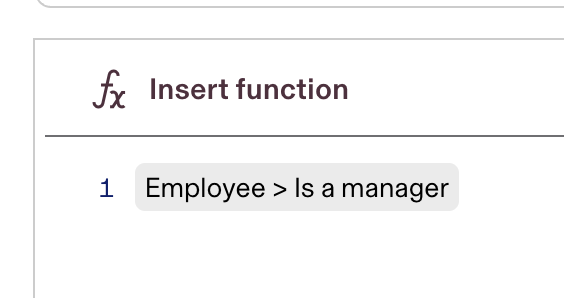
- Click Continue and specify which employees this field should apply to. Configure the permissions of who can view and edit this custom field.
- Specify the permission classification of the field as Non-sensitive employment data and click Save.
Call the API and expand custom fields
Call GET List Workers and expand custom_fields to retrieve each employee’s newly-created custom field information.
Request:
curl -L -X GET 'https://rest.ripplingapis.com/workers/?expand=custom_fields' \
-H 'Accept: application/json' \
-H 'Authorization: Bearer REDACTED'
Response:
{
  "results": [
    {
      "id": "64a1b2c3d4e5f67890123456",
      "created_at": "2024-01-15T18:22:10+00:00",
      "updated_at": "2026-10-01T14:03:41+00:00",
      "work_email": "alex.chen@example.com",
      "status": "ACTIVE",
      "custom_fields": [
        {
          "id": "65b2c3d4e5f6789012345678",
          "name": "employee_is_manager_api",
          "type": "text",
          "value": "True"
        }
      ]
    },
    {
      "id": "64a1b2c3d4e5f67890123457",
      "created_at": "2024-03-02T16:11:05+00:00",
      "updated_at": "2026-09-18T09:44:12+00:00",
      "work_email": "jordan.lee@example.com",
      "status": "ACTIVE",
      "custom_fields": [
        {
          "id": "65b2c3d4e5f6789012345678",
          "name": "employee_is_manager_api",
          "type": "text",
          "value": "False"
        }
      ]
    }
  ],
  "next_link": null
}
Custom fields will take a few minutes to populate in an API response after their initial creation.
Troubleshoot missing custom field values
If custom field values are missing or null in a workers response, check the following.
| Error | Cause | Solution |
|---|---|---|
Workers come back without custom_fields | The request doesn't expand custom fields. | Add expand=custom_fields to the request. |
custom_fields is null and listed in __meta.redacted_fields with the reason Insufficient oauth scopes | The API token doesn't have the workers.custom-fields.read scope. | Add workers.custom-fields.read to the token. See API tokens and permissions. |
A custom field you expect isn't in the custom_fields array | The person who created the token can't view that field. Fields they can't view are left out of the array. | Use a token created by someone with view access to the field. See Worker and user field access. |
A custom field shows "value": null | The field has no value for that employee. | Set the value in Rippling, then call the API again. |
| A new custom field doesn't appear yet | New custom fields take a few minutes to show up in API responses. | Wait a few minutes, then call the API again. |